> ## Documentation Index
> Fetch the complete documentation index at: https://docs.teal.dev/llms.txt
> Use this file to discover all available pages before exploring further.
# Reviewing transactions
> Build a transaction review workflow
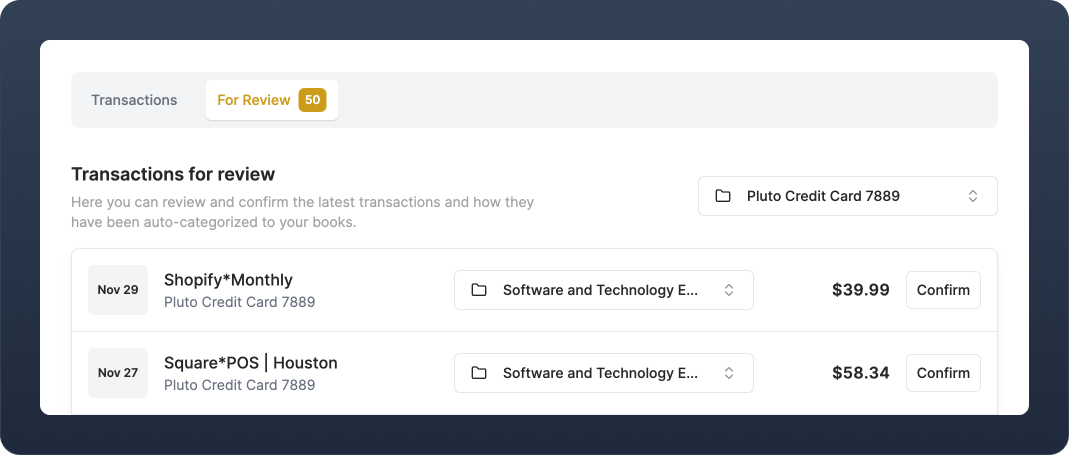
The goal of categorizing transactions is to ensure that your user's accounting reports are accurate. Teal's [auto-categorization](/guides/platform/categorization/pipeline) pipeline streamlines much of this tedious process, but sometimes you will want to prompt your users to confirm some transactions.
We call this key accounting workflow **Reviewing Transactions**, and versions of this workflow exist in most popular accounting products. Using a combination of the [Transactions](/api-reference/transactions/list-a-ledger's-transactions) and [Ledger](/api-reference/ledgers/list-all-ledgers) endpoints, you can build a customizable transaction review workflow for your users.
***
## Implementation example
Display the transactions that you want your users to review. In this example, all transactions with `review_status` = `unreviewed` are displayed. This is the default status for all newly created transactions.
Use the [List Transactions](/api-reference/transactions/list-a-source-account's-transactions) endpoint with the `source_account_id` of a specific transaction source account to get a list of all `unreviewed` transactions.
```tsx theme={null}
const options = {
method: 'GET',
headers: {
Authorization: AUTHORIZATION_KEY
'teal-instance-id': TEAL_INSTANCE_ID,
}
};
const source_account_id = 12345;
const request = await fetch(`https://api.sandbox.teal.dev/v0/source-accounts/${source_account_id}/transactions?review_status=unreviewed&expand=opposing_line_entries.ledger`, options)
const data = await request.json();
```
Display these to the user by iterating over `data.records`.
Sometimes a user needs to change how a Transaction is categorized. To do this, you need a list of all Ledgers and then allow the user to select which one they would like to assign as the new category.
1. Use `/v0/ledgers` to retrieve all Ledgers.
```tsx theme={null}
const options = {
method: 'GET',
headers: {
Authorization: AUTHORIZATION_KEY,
'teal-instance-id': TEAL_INSTANCE_ID
}
};
const request = await fetch(`https://api.sandbox.teal.dev/v0/ledgers`, options)
const data = await request.json();
```
Display the possible ledgers in a `
Once the user has reviewed the transaction and confirm the category, update the Transaction `review_status` from `unreviewed` to `reviewed` using the [Update Transaction](/api-reference/transactions/update-a-transaction) endpoint with `source_account_id` and `transaction_id`, passing along the new review status.
```tsx theme={null}
const options = {
method: 'PUT',
headers: {
Authorization: AUTHORIZATION_KEY,
'Content-Type': 'application/json',
'teal-instance-id': TEAL_INSTANCE_ID
},
body: {
"review_status": "reviewed"
}
};
const request = await fetch(`https://api.sandbox.teal.dev/v0/source-accounts/${source_account_id}/transactions/${transaction_id}`, options);
const response = await request.json();
```
***
## Notes
* When a Transaction is processed in Teal's [auto-categorization](/guides/platform/categorization/pipeline) pipeline and it does not match any ledger, it will be categorized as either an **Uncategorized Cash Inflow** or **Uncategorized Cash Outflow**. You can choose to only display transactions with these categories in your review list.
* Use the `categorization_method` attribute to filter transactions based on what categorization step they were categorized at. For example, you may want users to only review transactions that have gone through the AI categorization step, but not those categorized by Instance level rules.
***
## Relevant resources
* [Core accounting concepts](guides/introduction/core_concepts)
* [Platform auto-categorization settings](https://developer.teal.dev/auto_categorization)
* [Transactions API](/api-reference/transactions/list-a-ledger's-categorized-transactions)
* [Ledger API](/api-reference/ledgers/list-all-ledgers)
 The goal of categorizing transactions is to ensure that your user's accounting reports are accurate. Teal's [auto-categorization](/guides/platform/categorization/pipeline) pipeline streamlines much of this tedious process, but sometimes you will want to prompt your users to confirm some transactions.
We call this key accounting workflow **Reviewing Transactions**, and versions of this workflow exist in most popular accounting products. Using a combination of the [Transactions](/api-reference/transactions/list-a-ledger's-transactions) and [Ledger](/api-reference/ledgers/list-all-ledgers) endpoints, you can build a customizable transaction review workflow for your users.
***
## Implementation example
The goal of categorizing transactions is to ensure that your user's accounting reports are accurate. Teal's [auto-categorization](/guides/platform/categorization/pipeline) pipeline streamlines much of this tedious process, but sometimes you will want to prompt your users to confirm some transactions.
We call this key accounting workflow **Reviewing Transactions**, and versions of this workflow exist in most popular accounting products. Using a combination of the [Transactions](/api-reference/transactions/list-a-ledger's-transactions) and [Ledger](/api-reference/ledgers/list-all-ledgers) endpoints, you can build a customizable transaction review workflow for your users.
***
## Implementation example